Flexi and Timesheet Management Application
Python & SQL Server Project
Abstract
This project involved designing and developing a browser-based flexi and timesheet management application for the Property Repairs Service at Rugby Borough Council.
The service required a more effective way for employees to record their working hours and for managers to monitor flexi and time off in lieu (TOIL) balances. The existing process provided limited management visibility and required a significant amount of manual calculation and checking.
I developed a custom application using Python, Streamlit and SQL Server. Employees could securely log in, record their working times, review previous entries and monitor their current balance. The application automatically calculated total working hours and the resulting flexi or TOIL adjustment based on the times entered.
Managers were provided with separate role-based views through which they could review employee records, monitor balances and examine summary graphs. All records were stored centrally in a secure SQL database rather than being held across individual spreadsheets.
Data protection note: Any screenshots displayed within this portfolio use dummy or anonymised data. No live employee, council or personally identifiable information is shown.
Project Objectives
The main objectives of the application were to:
- Provide employees with a simple way to record their working hours.
- Automatically calculate daily hours worked.
- Automatically calculate flexi and TOIL adjustments.
- Maintain an accurate running balance for each employee.
- Reduce manual calculations and spreadsheet administration.
- Give managers appropriate oversight of employee balances.
- Restrict information according to each user’s role.
- Store all records centrally within a secure SQL Server database.
- Provide summary information and visual trends for management review.
- Make the application accessible through a standard web browser.
Data and Application Development Lifecycle
1. Plan
The first stage was to understand how flexi information was recorded and how different users needed to interact with it.
Employees required a straightforward form through which they could enter their working hours without needing to understand the calculations behind the system.
The entry form needed to capture information such as:
- Week or reporting period.
- Work date.
- Start time.
- Finish time.
- Lunch or break duration.
- Absence information where applicable.
- Notes or supporting comments.
The application then needed to calculate:
- Total hours worked.
- Contracted hours for the day.
- The difference between hours worked and contracted hours.
- The resulting flexi or TOIL adjustment.
- The employee’s cumulative balance.
Managers had different requirements. They needed visibility of the employees within their management scope, including individual entries, current balances and patterns over time.
Administrators also required additional controls to manage user accounts, access permissions and application settings.
This led to the creation of three main user roles:
- User: Enter and review their own timesheet records.
- Manager: Review their own records and those of assigned employees.
- Administrator: Manage users, permissions and application-level settings.
2. Prepare
Before developing the user interface, the data structure and security requirements needed to be established.
A SQL Server database was selected because the application required:
- Centralised data storage.
- Reliable multi-user access.
- Structured relationships between users and timesheet records.
- Secure handling of employee information.
- The ability to filter manager access to specific employees.
- Consistent calculations and reporting.
- An auditable record of timesheet entries.
The application was designed around several core database objects.
User accounts
The user table stored information required for authentication and application access, including:
- Username.
- Password hash.
- User role.
- Account status.
- Failed login attempts.
- Password and account-management information.
Timesheet entries
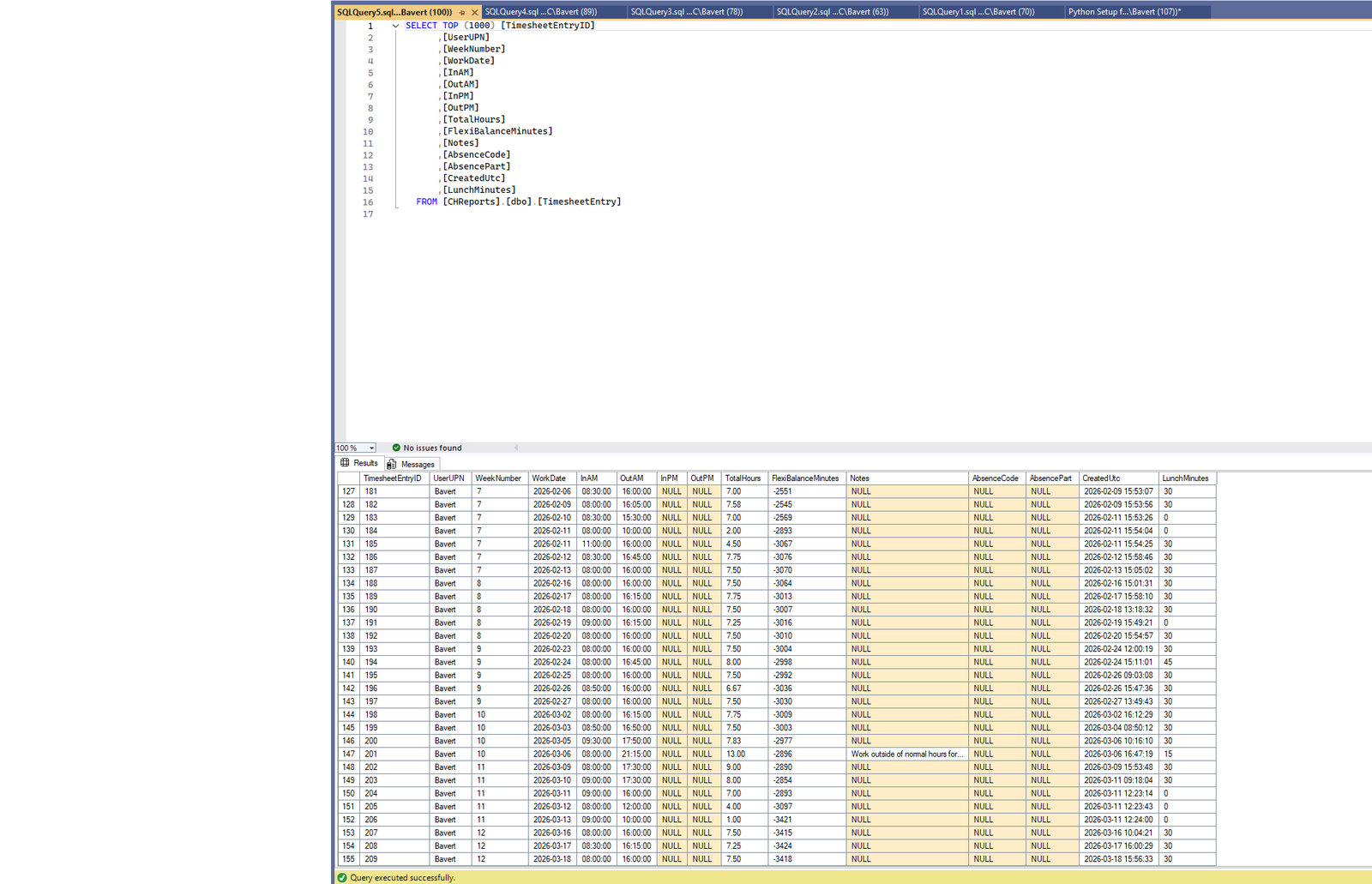
The timesheet table recorded:
- Employee or user reference.
- Week.
- Work date.
- Start and finish times.
- Lunch duration.
- Total hours worked.
- Daily flexi adjustment.
- Absence information.
- Notes.
- Date created and last updated.
Manager scope
A separate manager-scope structure linked managers to the employees they were permitted to view.
This prevented managers from seeing records outside their own area of responsibility and allowed access permissions to be maintained without changing the underlying timesheet data.
3. Application Design
Streamlit was selected as the application framework because it allowed a secure, interactive browser-based interface to be developed entirely in Python.
The application was divided into role-controlled sections.
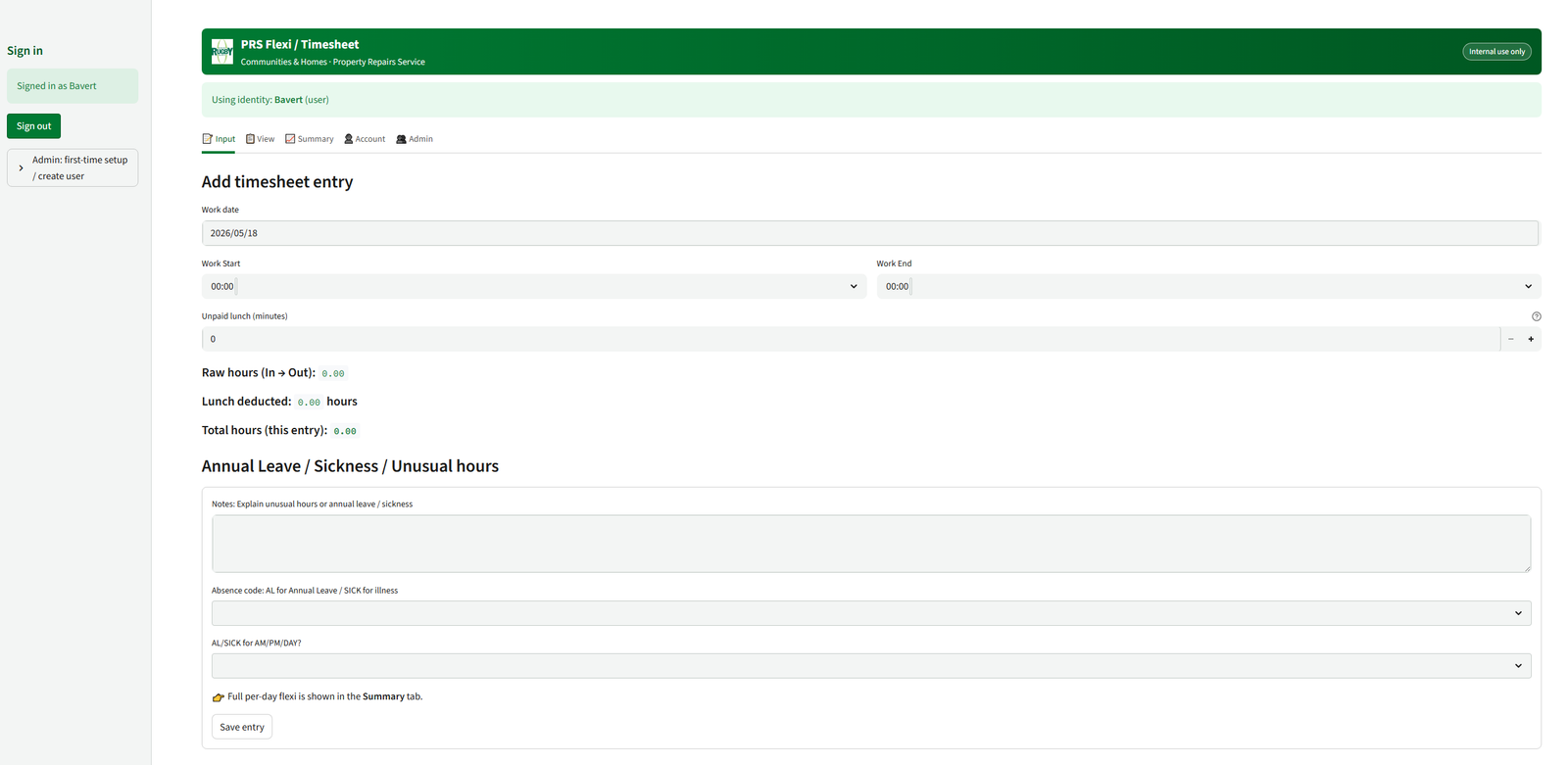
Input
The input page allowed employees to submit their daily working information.
The form was designed to minimise manual input and included validation to prevent incomplete or invalid entries. Times were converted into a consistent format before calculations were completed and the record was written to SQL Server.
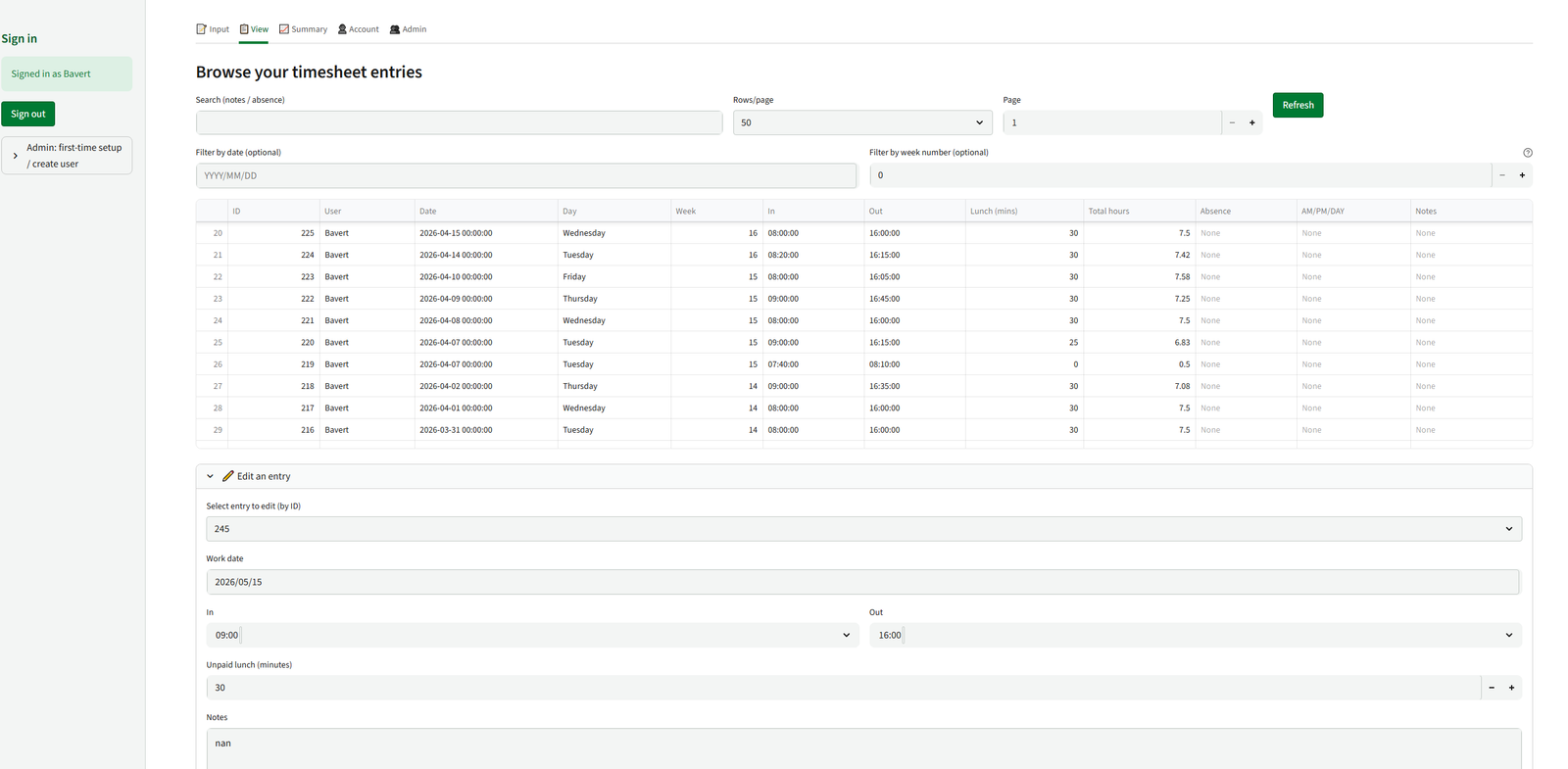
View
The view page allowed users to review their previous entries.
Employees could only view their own records, while managers could select from the employees assigned to them.
The records could be filtered by date or reporting period, making it easier to identify individual entries and investigate balance changes.
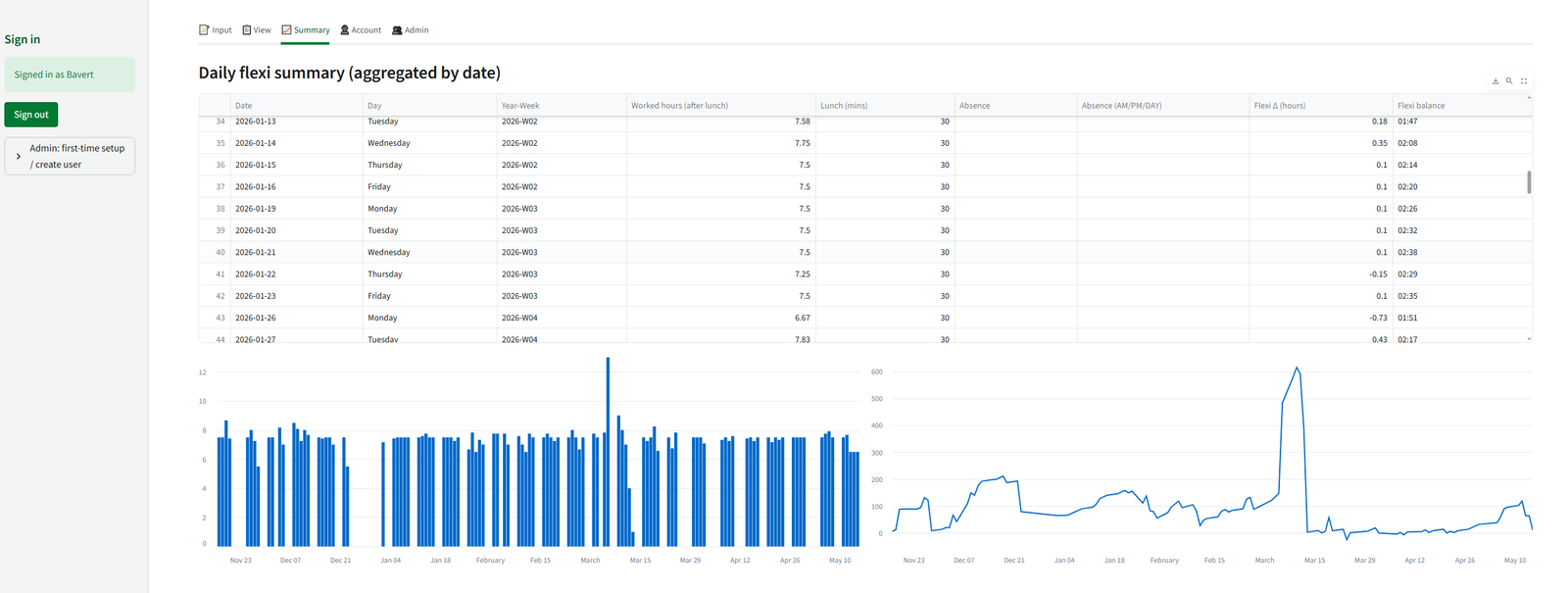
Summary
The summary page presented calculated information such as:
- Total hours recorded.
- Current flexi or TOIL balance.
- Positive and negative adjustments.
- Changes over time.
- Patterns within the selected reporting period.
Graphs were included to help employees and managers understand how balances had changed rather than relying only on individual timesheet rows.
Account
The account section allowed users to manage their own login information, including changing their password and securely signing out of the application.
Administration
The administrator section provided additional controls for:
- Creating user accounts.
- Assigning user roles.
- Activating or deactivating accounts.
- Assigning employees to managers.
- Reviewing account status.
- Resetting or managing access where required.
Tabs and pages were displayed according to the logged-in user’s role, preventing users from accessing application functions for which they did not have permission.
4. Flexi and TOIL Calculations
One of the main purposes of the application was to remove the need for employees or managers to calculate flexi balances manually.
The application calculated the total working time from the employee’s start time, finish time and recorded break duration.
A simplified version of the calculation was:
Total hours worked = Finish time − Start time − Break duration
The calculated working time was then compared with the employee’s expected contracted hours.
For a standard full working day, the application used a configured daily requirement of 7.5 hours.
The daily balance was calculated as:
Daily flexi adjustment = Total hours worked − Contracted daily hours
For example:
- Working more than the contracted hours produced a positive adjustment.
- Working fewer than the contracted hours produced a negative adjustment.
- Approved absence information could be incorporated so that an employee was not incorrectly penalised for recorded leave or another authorised absence.
The resulting adjustment was stored in minutes within the database. Using minutes rather than decimal hours reduced rounding issues and allowed balances to be converted reliably into an hours-and-minutes format for display.
The employee’s running balance was generated from their recorded daily adjustments, providing an up-to-date flexi or TOIL position.
5. SQL Database Integration
The Streamlit application connected directly to SQL Server using Python database functions.
Stored procedures and controlled SQL queries were used for operations such as:
- Retrieving a user’s timesheet records.
- Retrieving records visible to a manager.
- Inserting a new timesheet entry.
- Updating an existing entry.
- Retrieving summary information.
- Managing user permissions.
Separating database operations from the visual interface helped make the application easier to maintain and reduced the amount of SQL logic contained directly within individual Streamlit pages.
The SQL database provided a single source of truth for the application. Employees and managers therefore worked from the same current information rather than maintaining separate copies of spreadsheets.
The database approach also provided greater control over:
- Data types.
- Required fields.
- Record relationships.
- Duplicate prevention.
- User access.
- Data validation.
- Future reporting and analysis.
6. Authentication and Security
As the application contained employee working information, access control was an important part of the project.
A local authentication system was developed using application user accounts stored within SQL Server.
Passwords were not stored as readable text. They were protected using Argon2 password hashing, allowing the application to verify a password without storing the original password.
Additional login controls included:
- Role-based access.
- Active and inactive account statuses.
- Failed-login tracking.
- Account lockout after repeated unsuccessful login attempts.
- Secure password changes.
- Session-based login management.
- A sign-out function.
- Restricted administrator functions.
The application used a five-attempt login lockout to reduce the risk of repeated unauthorised password attempts.
Role controls were applied throughout the application rather than only to the navigation menu. Database queries and page functions also restricted the data returned to each user.
This meant that hiding a manager or administrator page was not the only control preventing unauthorised access; the underlying data-retrieval logic also checked the user’s permissions.
7. Analysis and Management Reporting
In addition to capturing timesheet data, the application provided summary information for operational oversight.
Management views allowed authorised users to review:
- Current employee balances.
- Employees with high positive balances.
- Employees with negative balances.
- Daily and weekly changes.
- Working-hour trends.
- Missing or incomplete entries.
- Individual timesheet histories.
Graphs were used to make changes over time easier to interpret. This allowed managers to identify developing issues before they became difficult to manage.
For example, a continually increasing positive balance could indicate that an employee was regularly working beyond their contracted hours. A falling or negative balance could indicate incomplete hours, missing records or an issue requiring discussion.
The management views therefore supported both administrative oversight and more informed conversations with employees.
8. Refine and Test
The application was refined through repeated testing of both the calculations and the user experience.
Testing included:
- Checking total-hour calculations across different start and finish times.
- Testing lunch and break deductions.
- Checking positive and negative flexi adjustments.
- Testing records containing authorised absence.
- Confirming that running balances were calculated correctly.
- Preventing invalid time combinations.
- Testing the creation and editing of records.
- Confirming that employees could only view their own data.
- Confirming that managers only saw assigned employees.
- Testing failed-login and account-lockout behaviour.
- Reviewing the layout on desktop and mobile browsers.
The input process was kept as simple as possible because the application needed to be usable by employees who did not routinely work with databases or analytical systems.
Clear labels, validation messages and confirmation messages were included to help users understand whether an entry had been accepted and how the recorded hours affected their balance.
9. Communicate and Implement
The application was deployed as an internal browser-based service.
Streamlit provided the front-end interface, while SQL Server stored the user accounts, timesheet entries, permissions and calculated information.
The application could be hosted on an always-on Windows computer or internal server and accessed through a standard browser by authorised users on the appropriate network connection.
This approach meant users did not require:
- Direct SQL Server access.
- Database-management software.
- Python installed on their own device.
- Access to the application source code.
- Individual copies of a spreadsheet.
Employees only needed the application address and their authorised login details.
Guidance could then be provided for:
- Logging in.
- Entering working times.
- Recording breaks and absence.
- Reviewing submitted entries.
- Understanding the displayed balance.
- Correcting an entry.
- Accessing management summaries.
Outcomes and Feedback
The completed application provided a central and structured method for recording flexi and TOIL information.
Employees could submit their working hours through a straightforward browser interface, while the application completed the calculations automatically.
Managers received improved visibility of employee balances without needing to request, combine or manually review separate spreadsheets.
The application also improved data security and consistency by storing all records within SQL Server and restricting access according to the logged-in user’s role.
Key Outcomes
- Developed a complete browser-based application using Python and Streamlit.
- Created a secure SQL Server database for employee and timesheet information.
- Automated total-hours, flexi and TOIL calculations.
- Replaced manual balance calculations with consistent application logic.
- Created separate employee, manager and administrator access levels.
- Implemented secure password hashing using Argon2.
- Added failed-login controls and account lockout.
- Restricted managers to employees within their assigned management scope.
- Provided employees with access to their own records and current balance.
- Developed management summaries and graphs.
- Created a central source of truth for flexi records.
- Reduced reliance on locally maintained spreadsheets.
- Designed the application for access through standard desktop and mobile browsers.
Benefits
Improved management visibility
Managers could view current balances and historical records for their assigned employees from a single application.
More accurate calculations
Flexi and TOIL adjustments were calculated consistently from the submitted working times, reducing the risk of spreadsheet formula errors or inconsistent manual calculations.
Better data security
Employee information was held within a controlled SQL database rather than being distributed across separate files.
Clearer accountability
Records were associated with individual user accounts, providing clearer ownership of submitted information.
Reduced administration
Employees entered their own information, while automated calculations and summary views reduced the amount of manual checking required from managers.
Centralised information
The SQL database provided one current version of each employee’s timesheet and balance.
Scalable design
The use of database tables, user roles and manager assignments allowed additional employees and teams to be added without creating separate applications or spreadsheets.
Limitations
The application depended on the accuracy of the times submitted by employees. Although validation could identify invalid or incomplete entries, it could not independently confirm that the recorded start and finish times reflected the hours actually worked.
The initial calculation model was based on configured working-hour rules, including a standard 7.5-hour working day. Employees with alternative working patterns could require additional configuration or separate contracted-hours records.
The local authentication system provided controlled application access but also required administrators to manage account creation, password support and role assignments.
As a custom Streamlit application, new business rules or changes to the council’s flexi policy required updates to the application logic and testing before release.
Recommendations and Future Development
Potential future developments include:
- Adding individual contracted working patterns for part-time employees.
- Supporting different expected hours for each day of the week.
- Introducing formal manager approval for submitted timesheets.
- Adding an audit history for all changes to a record.
- Allowing employees to submit requests to use accumulated flexi or TOIL.
- Adding automated warnings when a balance exceeds an agreed threshold.
- Sending reminders for missing timesheet entries.
- Providing downloadable employee and management reports.
- Adding monthly balance snapshots.
- Creating further workforce-capacity and working-pattern analysis.
- Integrating with a corporate identity provider where organisational infrastructure permits.
- Adding automated testing for the main calculation and permission rules.
Reflection
This project demonstrated how a relatively common administrative process could be improved through a custom data application.
The main challenge was not simply creating a form for entering working times. The application needed to combine accurate time calculations, secure authentication, role-based data access, database design and a user interface that remained straightforward for employees.
Developing the application strengthened my practical experience in:
- Python application development.
- Streamlit interface design.
- SQL Server database integration.
- Relational database design.
- Stored procedures and parameterised queries.
- Authentication and password security.
- Role-based access control.
- Time and duration calculations.
- Data validation.
- Management reporting and visualisation.
- Application testing and deployment.
The final solution provided employees with a clear way to record their hours and gave managers improved visibility of flexi and TOIL balances. It also demonstrated how Python, Streamlit and SQL Server can be combined to replace a spreadsheet-led process with a secure, centralised and scalable application.
Code & Screenshots
Python: Streamlit App
# Streamlit + Local Auth (Argon2) + SQL Server 2019
# PRS Flexi / Timesheet app
import os # Used for interacting with the operating system
from typing import Optional # Typing module, used for defining functions or variables that may not have a value
from datetime import date, datetime, time as dtime # Handles calendar dates with time
import pandas as pd # Used for creating dataframes, cleaning data and returning SQL results in data form.
import pyodbc # Connects python to SQL server
import streamlit as st # Streamlit web framework, handles forms, buttons and tables
from dotenv import load_dotenv # Loads environment variables from an .env file from the OS, useful for DB passwords, secret keys, admin username lists.
from argon2 import PasswordHasher # Secure password hashing algorithm, hashes new passwords
from argon2.exceptions import VerifyMismatchError # Allows passwords to fail and produces an output like 'Incorrect password'
import base64 # For embedding logo as base64
# ---------- ENV + CONFIG ----------
# load_dotenv(override=False)
# SQL_SERVER = os.getenv("SQL_SERVER") # Reads OS environment variable for SQL server location (e.g. database.windows.net)
# SQL_DATABASE = os.getenv("SQL_DATABASE") # Reads the OS environment variable for the SQL database name
# SQL_ENCRYPT = os.getenv("SQL_ENCRYPT", "no") # If no encryption is set use 'no' otherwise AZURE would need 'yes'
# SQL_TRUSTCERT = os.getenv("SQL_TRUST_SERVER_CERT", "no") # If no certification is set use 'no' otherwise AZURE would need 'yes'
# BOOTSTRAP_CODE = os.getenv("APP_BOOTSTRAP_CODE") # one-time admin creation
SQL_SERVER = "REDACTED"
SQL_DATABASE = "REDACTED"
SQL_ENCRYPT = "no"
SQL_TRUSTCERT = "no"
BOOTSTRAP_CODE = "REDACTED"
# Contracted daily hours for flexi calc
CONTRACTED_DAILY_HOURS = 7.4 # 7.5 hours per working day
st.set_page_config(page_title="PRS Flexi database", page_icon="🔐", layout="wide") # Configures Streamlit page before rendering.
# ---------- Custom RBC styling ----------
RBC_GREEN = "#007A33"
RBC_GREEN_DARK = "#005822"
CUSTOM_CSS = f"""
<style>
/* Base page */
body {{
background-color: #FFFFFF;
color: #1A1A1A;
}}
/* Main content container */
.main .block-container {{
padding-top: 1rem;
padding-bottom: 2rem;
}}
/* Sidebar */
section[data-testid="stSidebar"] {{
background-color: #F3F5F4;
border-right: 1px solid #D0D6D3;
}}
section[data-testid="stSidebar"] h1,
section[data-testid="stSidebar"] h2,
section[data-testid="stSidebar"] h3 {{
color: {RBC_GREEN_DARK};
}}
/* Buttons */
.stButton > button {{
background-color: {RBC_GREEN};
color: white;
border-radius: 4px;
border: 1px solid {RBC_GREEN_DARK};
padding: 0.35rem 0.9rem;
font-weight: 600;
}}
.stButton > button:hover {{
background-color: {RBC_GREEN_DARK};
border-color: {RBC_GREEN_DARK};
color: #FFFFFF;
}}
/* Tabs */
div[data-baseweb="tab-list"] > button {{
color: #555555;
font-weight: 500;
border-bottom: 2px solid transparent;
}}
div[data-baseweb="tab-list"] > button[aria-selected="true"] {{
color: {RBC_GREEN_DARK};
border-color: {RBC_GREEN};
}}
/* Inputs tidy borders */
.stTextInput > div > div > input,
.stTextArea textarea,
.stNumberInput input,
.stDateInput input,
.stTimeInput input,
.stSelectbox > div > div {{
border-radius: 4px;
border: 1px solid #C4CBC7;
}}
.stTextInput > div > div > input:focus,
.stTextArea textarea:focus,
.stNumberInput input:focus,
.stDateInput input:focus,
.stTimeInput input:focus {{
border-color: {RBC_GREEN};
box-shadow: 0 0 0 1px {RBC_GREEN}20;
}}
/* RBC header bar */
.rbc-header {{
display: flex;
align-items: center;
justify-content: space-between;
padding: 0.6rem 1.0rem;
margin-bottom: 0.75rem;
border-radius: 0.5rem;
background: linear-gradient(90deg, {RBC_GREEN} 0%, {RBC_GREEN_DARK} 100%);
color: #FFFFFF;
}}
.rbc-header-left {{
display: flex;
align-items: center;
gap: 0.75rem;
}}
.rbc-header-title {{
font-size: 1.25rem;
font-weight: 700;
}}
.rbc-header-subtitle {{
font-size: 0.9rem;
opacity: 0.9;
}}
.rbc-header-logo img {{
height: 40px;
}}
.rbc-header-tag {{
font-size: 0.8rem;
padding: 0.15rem 0.6rem;
border-radius: 999px;
border: 1px solid #FFFFFF90;
background-color: #FFFFFF22;
}}
/* Footer */
.rbc-footer {{
margin-top: 2rem;
font-size: 0.8rem;
color: #666666;
border-top: 1px solid #E0E4E2;
padding-top: 0.5rem;
}}
</style>
"""
st.markdown(CUSTOM_CSS, unsafe_allow_html=True)
# ---------- RBC Header ----------
RBC_LOGO_PATH = r"C:\Users\bavert\.streamlit\RBC_logo.jpg" # Adjust if needed
header_html = f"""
<div class="rbc-header">
<div class="rbc-header-left">
<div class="rbc-header-logo">
<img src="data:image/png;base64,{{logo_b64}}" alt="Rugby Borough Council logo">
</div>
<div>
<div class="rbc-header-title">PRS Flexi / Timesheet</div>
<div class="rbc-header-subtitle">Communities & Homes · Property Repairs Service</div>
</div>
</div>
<div class="rbc-header-tag">
Internal use only
</div>
</div>
"""
logo_b64 = ""
try:
with open(RBC_LOGO_PATH, "rb") as f:
logo_b64 = base64.b64encode(f.read()).decode("utf-8")
except Exception:
# If logo not found, we just render text header without image
header_html = header_html.replace(
'<div class="rbc-header-logo">\n <img src="data:image/png;base64,{logo_b64}" alt="Rugby Borough Council logo">\n </div>',
""
)
st.markdown(header_html.format(logo_b64=logo_b64), unsafe_allow_html=True)
# ---------- SQL CONNECTION ----------
def conn_str() -> str:
parts = [
"DRIVER={ODBC Driver 17 for SQL Server};",
f"SERVER={SQL_SERVER};",
f"DATABASE={SQL_DATABASE};",
"Trusted_Connection=Yes;", # 👈 back to Windows integrated auth
f"Encrypt={SQL_ENCRYPT};",
]
if SQL_ENCRYPT.lower() == "yes":
parts.append(f"TrustServerCertificate={SQL_TRUSTCERT};")
return "".join(parts)
def get_conn():
return pyodbc.connect(conn_str())
# ---------- AUTH HELPERS (AppUsers) ----------
ph = PasswordHasher()
def get_user_row(username: str) -> Optional[dict]:
q = """
SELECT UserID, Username, DisplayName, PasswordHash, Role, IsActive
FROM dbo.AppUsers WHERE LOWER(Username)=LOWER(?)
"""
with get_conn() as cn:
df = pd.read_sql(q, cn, params=[username])
if df.empty:
return None
return df.iloc[0].to_dict()
def create_user(username: str, display_name: str, raw_password: str, role: str = "user") -> None:
hash_str = ph.hash(raw_password)
with get_conn() as cn, cn.cursor() as cur:
cur.execute(
"""
INSERT INTO dbo.AppUsers (Username, DisplayName, PasswordHash, Role, IsActive)
VALUES (?, ?, ?, ?, 1)
""",
(username, display_name or username, hash_str, role),
)
cn.commit()
def update_password(username: str, raw_password: str) -> None:
hash_str = ph.hash(raw_password)
with get_conn() as cn, cn.cursor() as cur:
cur.execute(
"UPDATE dbo.AppUsers SET PasswordHash=? WHERE LOWER(Username)=LOWER(?)",
(hash_str, username),
)
cn.commit()
# ---------- TIMESHEET DB HELPERS ----------
def fetch_rows_paged(user_upn: str, search: Optional[str], offset: int, fetch: int) -> pd.DataFrame:
with get_conn() as cn:
return pd.read_sql(
"EXEC dbo.usp_Timesheet_GetMyRowsPaged ?, ?, ?, ?",
cn,
params=[user_upn, search, offset, fetch],
)
def fetch_rows_all(user_upn: str) -> pd.DataFrame:
with get_conn() as cn:
return pd.read_sql(
"EXEC dbo.usp_Timesheet_GetMyRows ?",
cn,
params=[user_upn],
)
# --- Admin helpers: all rows / all users ---
def fetch_rows_paged_admin(search: Optional[str], offset: int, fetch: int) -> pd.DataFrame:
"""
Admin: fetch all rows from TimesheetEntry with optional search.
Uses positional ? parameters because pyodbc doesn't support named params here.
"""
q = """
SELECT *
FROM dbo.TimesheetEntry
WHERE ( ? IS NULL
OR Notes LIKE '%' + ? + '%'
OR AbsenceCode LIKE '%' + ? + '%'
OR UserUPN LIKE '%' + ? + '%')
ORDER BY WorkDate DESC, UserUPN, TimesheetEntryID DESC
OFFSET ? ROWS FETCH NEXT ? ROWS ONLY;
"""
params = [search, search, search, search, offset, fetch]
with get_conn() as cn:
return pd.read_sql(q, cn, params=params)
def fetch_rows_paged_admin_for_user(filter_user: str, search: Optional[str], offset: int, fetch: int) -> pd.DataFrame:
"""
Admin: fetch rows for a specific user (filter_user).
"""
q = """
SELECT *
FROM dbo.TimesheetEntry
WHERE UserUPN = ?
AND ( ? IS NULL
OR Notes LIKE '%' + ? + '%'
OR AbsenceCode LIKE '%' + ? + '%')
ORDER BY WorkDate DESC, TimesheetEntryID DESC
OFFSET ? ROWS FETCH NEXT ? ROWS ONLY;
"""
params = [filter_user, search, search, search, offset, fetch]
with get_conn() as cn:
return pd.read_sql(q, cn, params=params)
def fetch_rows_all_admin_for_user(filter_user: str) -> pd.DataFrame:
"""
Admin-only helper: fetch all rows for a specific user,
bypassing the per-user stored procedure.
"""
q = "SELECT * FROM dbo.TimesheetEntry WHERE UserUPN = ?"
with get_conn() as cn:
return pd.read_sql(q, cn, params=[filter_user])
def fetch_all_usernames_from_timesheet() -> list[str]:
q = "SELECT DISTINCT UserUPN FROM dbo.TimesheetEntry ORDER BY UserUPN"
with get_conn() as cn:
df = pd.read_sql(q, cn)
return df["UserUPN"].dropna().tolist() if not df.empty else []
def fetch_managed_users(manager_username: str) -> list[str]:
"""
Return a list of UserUPN that this manager is allowed to see.
"""
q = """
SELECT DISTINCT UserUPN
FROM dbo.ManagerScope
WHERE LOWER(ManagerUsername) = LOWER(?)
ORDER BY UserUPN;
"""
with get_conn() as cn:
df = pd.read_sql(q, cn, params=[manager_username])
return df["UserUPN"].dropna().tolist() if not df.empty else []
def get_last_flexi_balance(user_upn: str) -> int:
"""
Get the last stored FlexiBalanceMinutes for this user.
Returns 0 if no previous rows.
"""
q = """
SELECT TOP (1) FlexiBalanceMinutes
FROM dbo.TimesheetEntry
WHERE UserUPN = ?
ORDER BY WorkDate DESC, TimesheetEntryID DESC
"""
with get_conn() as cn:
df = pd.read_sql(q, cn, params=[user_upn])
if df.empty or pd.isna(df.iloc[0]["FlexiBalanceMinutes"]):
return 0
return int(df.iloc[0]["FlexiBalanceMinutes"])
def insert_row(
user_upn: str,
week: int,
work_date: date,
in_am,
out_am,
in_pm,
out_pm,
lunch_mins: int,
total_hours: float,
flexi_minutes: int,
notes: Optional[str],
absence: Optional[str],
absence_part: Optional[str],
):
"""
Insert a single-stint day with an optional unpaid lunch (in minutes).
NOTE: Make sure usp_Timesheet_InsertRow has a @LunchMinutes parameter
in the same position we pass it here.
"""
with get_conn() as cn, cn.cursor() as cur:
cur.execute(
"""
EXEC dbo.usp_Timesheet_InsertRow
?, ?, ?, ?, ?, ?, ?, ?, ?, ?, ?, ?, ?
""",
(
user_upn,
week,
work_date,
in_am,
out_am,
in_pm,
out_pm,
lunch_mins,
total_hours,
flexi_minutes,
notes,
absence,
absence_part,
),
)
cn.commit()
def update_row(
entry_id: int,
user_upn: str,
work_date: date,
in_am,
out_am,
in_pm,
out_pm,
lunch_mins: int,
total_hours: float,
notes: Optional[str],
absence: Optional[str],
absence_part: Optional[str],
):
"""
Update an existing entry, including LunchMinutes.
NOTE: Make sure usp_Timesheet_UpdateRow has a @LunchMinutes parameter
in the same position we pass it here.
"""
with get_conn() as cn, cn.cursor() as cur:
cur.execute(
"""
EXEC dbo.usp_Timesheet_UpdateRow
?, ?, ?, ?, ?, ?, ?, ?, ?, ?, ?, ?
""",
(
entry_id,
user_upn,
work_date,
in_am,
out_am,
in_pm,
out_pm,
lunch_mins,
total_hours,
notes,
absence,
absence_part,
),
)
cn.commit()
# ---------- SESSION STATE ----------
if "auth_user" not in st.session_state:
st.session_state["auth_user"] = None
if "login_attempts" not in st.session_state:
st.session_state["login_attempts"] = 0
# ---------- SIDEBAR: SIGN IN / BOOTSTRAP ----------
with st.sidebar:
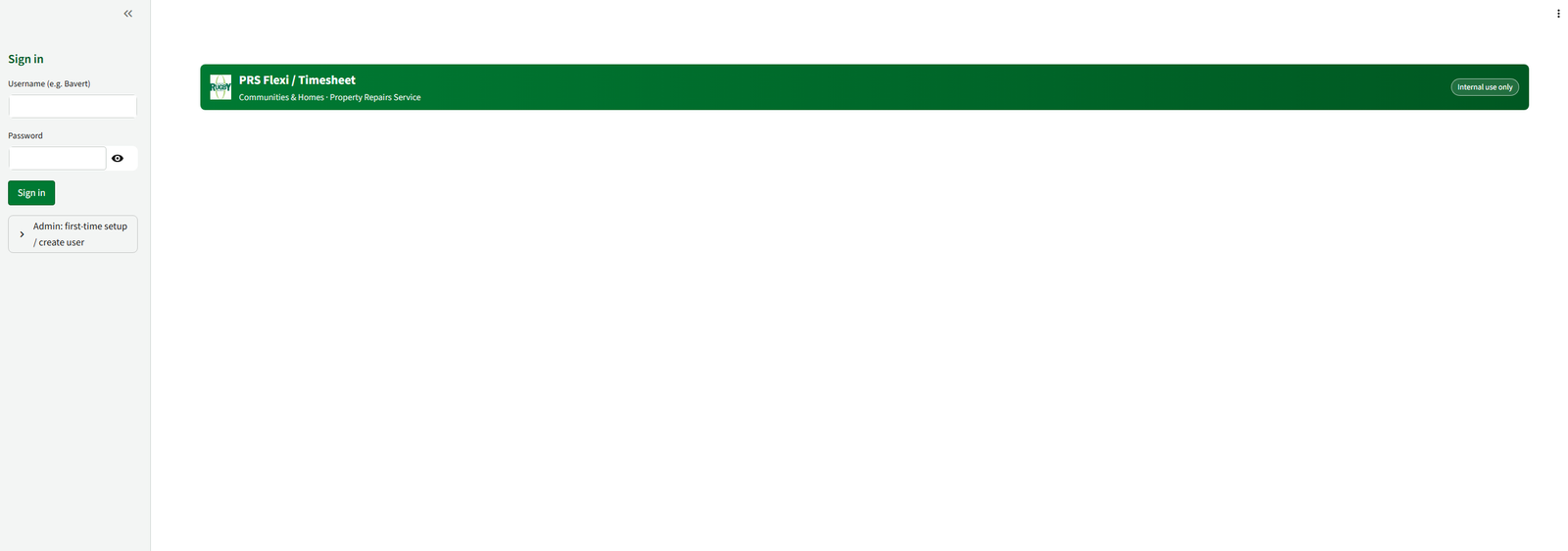
st.header("Sign in")
if st.session_state["auth_user"]:
st.success(f"Signed in as {st.session_state['auth_user']['Username']}")
if st.button("Sign out"):
st.session_state["auth_user"] = None
st.rerun()
else:
username = st.text_input("Username (e.g. Bavert)")
password = st.text_input("Password", type="password")
if st.button("Sign in"):
if st.session_state["login_attempts"] >= 5:
st.error("Too many attempts. Please wait and try again.")
else:
row = get_user_row(username.strip())
if not row or not row["IsActive"]:
st.session_state["login_attempts"] += 1
st.error("Invalid username or inactive account.")
else:
try:
ph.verify(row["PasswordHash"], password)
st.session_state["auth_user"] = row
st.session_state["login_attempts"] = 0
st.success("Signed in.")
st.rerun()
except VerifyMismatchError:
st.session_state["login_attempts"] += 1
st.error("Incorrect password.")
# Admin bootstrap for first user creation
with st.expander("Admin: first-time setup / create user"):
code = st.text_input("Bootstrap code (APP_BOOTSTRAP_CODE)", type="password")
new_user = st.text_input("New username (e.g. Bavert)")
new_name = st.text_input("Display name")
new_pass = st.text_input("New password", type="password")
new_role = st.selectbox("Role", ["user", "manager", "admin"])
if st.button("Create user"):
if not BOOTSTRAP_CODE:
st.error("Bootstrap disabled. Set APP_BOOTSTRAP_CODE env var temporarily.")
elif code != BOOTSTRAP_CODE:
st.error("Invalid bootstrap code.")
elif not new_user or not new_pass:
st.error("Username and password required.")
else:
if get_user_row(new_user):
st.error("User already exists.")
else:
try:
create_user(new_user.strip(), new_name.strip(), new_pass, new_role)
st.success(f"Created user {new_user} ({new_role}).")
except Exception as e:
st.error(f"Failed to create user: {e}")
# ---------- AUTH GATE ----------
user = st.session_state["auth_user"]
if not user:
st.stop()
user_upn = user["Username"]
user_role = (user.get("Role") or "").lower()
is_admin = user_role == "admin"
is_manager = user_role == "manager"
st.success(f"Using identity: **{user_upn}** ({user_role or 'user'})")
# ---------- HELPER: HOURS + FLEXI FORMATTING ----------
def calc_hours(t1, t2) -> float:
"""Return decimal hours between t1 and t2.
Treat 00:00→00:00 or missing values as 0."""
if not isinstance(t1, dtime) or not isinstance(t2, dtime):
return 0.0
if t1 == dtime(0, 0) and t2 == dtime(0, 0):
return 0.0
dt1 = datetime.combine(date.today(), t1)
dt2 = datetime.combine(date.today(), t2)
diff = dt2 - dt1
hours = diff.total_seconds() / 3600.0
return max(hours, 0.0)
def flexi_fmt(minutes: Optional[int]) -> str:
if minutes is None:
return ""
sign = "-" if minutes < 0 else ""
m = abs(minutes)
h = m // 60
mi = m % 60
return f"{sign}{int(h):02d}:{int(mi):02d}"
# ---------- TABS ----------
tab_input, tab_view, tab_summary, tab_account, tab_admin = st.tabs(
["📝 Input", "📋 View", "📈 Summary", "👤 Account", "👥 Admin"]
)
# --- INPUT TAB (single In/Out per entry, with lunch deduction) ---
with tab_input:
st.subheader("Add timesheet entry")
# Live inputs (no form so total hours updates immediately)
work_date = st.date_input("Work date", value=date.today())
week = work_date.isocalendar()[1]
col1, col2 = st.columns(2)
with col1:
in_time = st.time_input(
"Work Start",
value=dtime(0, 0),
key="in_time",
step=300, # 5-minute increments
)
with col2:
out_time = st.time_input(
"Work End",
value=dtime(0, 0),
key="out_time",
step=300, # 5-minute increments
)
# Unpaid lunch in minutes (0, 5, 10, ..., 180)
lunch_mins = st.number_input(
"Unpaid lunch (minutes)",
min_value=0,
max_value=180,
value=0,
step=5,
help="Time to subtract from worked hours for lunch."
)
# Raw worked hours (In → Out)
raw_hours = calc_hours(in_time, out_time)
# Net hours after lunch, never below zero
lunch_hours = lunch_mins / 60.0
total_hours = max(raw_hours - lunch_hours, 0.0)
st.markdown(
f" ##### **Raw hours (In → Out):** `{raw_hours:.2f}` \n"
f" ##### **Lunch deducted:** `{lunch_hours:.2f}` hours \n"
f"##### **Total hours (this entry): `{total_hours:.2f}`**"
)
# We get last flexi balance now so we can show a preview/change
last_balance = get_last_flexi_balance(user_upn)
# Absence + notes + save go in a form
st.markdown(
f"### Annual Leave / Sickness / Unusual hours"
)
with st.form("save_timesheet"):
notes = st.text_area("Notes: Explain unusual hours or annual leave / sickness")
absence = st.selectbox("Absence code: AL for Annual Leave / SICK for illness", ["", "AL", "SICK"])
absence_part = st.selectbox("AL/SICK for AM/PM/DAY?", ["", "AM", "PM", "DAY"])
# ---------- FLEXI: ENTRY-LEVEL PREVIEW ----------
weekday = work_date.weekday() # 0=Mon, 6=Sun
clean_abs = (absence or "").strip().upper()
is_absent = clean_abs != "" # any text means absence
flexi_delta_min = 0
if weekday < 5 and not is_absent:
# Normal working weekday, no absence → flexi = NET hours - contracted
delta_hours = total_hours - CONTRACTED_DAILY_HOURS
flexi_delta_min = int(round(delta_hours * 60))
else:
# Weekend OR any absence → no flexi change from this entry
flexi_delta_min = 0
new_balance = last_balance + flexi_delta_min
st.write(
f"👉 Full per-day flexi is shown in the **Summary** tab."
)
submitted = st.form_submit_button("Save entry")
if submitted:
try:
# Store net hours as TotalHours (after lunch deduction)
insert_row(
user_upn,
week,
work_date,
in_time, # InAM
out_time, # OutAM
None, # InPM
None, # OutPM
int(lunch_mins), # LunchMinutes
total_hours, # NET hours (after lunch)
new_balance, # historical balance; daily summary recomputes canonical flexi
notes or None,
absence or None,
absence_part or None,
)
st.success(
f"Timesheet entry saved."
)
except Exception as e:
st.error(f"Insert failed: {e}")
# --- VIEW TAB (user's own entries, with username column) ---
with tab_view:
st.subheader("Browse your timesheet entries")
c1, c2, c3, c4 = st.columns([2, 1, 1, 1])
with c1:
search = st.text_input("Search (notes / absence)")
with c2:
page_size = st.selectbox("Rows/page", options=[25, 50, 100, 200], index=1)
with c3:
page = st.number_input("Page", min_value=1, value=1, step=1)
with c4:
refresh = st.button("Refresh")
c5, c6 = st.columns(2)
with c5:
filter_date = st.date_input("Filter by date (optional)", value=None, key="view_date")
with c6:
filter_week = st.number_input(
"Filter by week number (optional)",
min_value=0,
max_value=53,
value=0,
step=1,
help="Use 0 to ignore week filter."
)
if refresh or True:
try:
df = fetch_rows_paged(
user_upn,
search if search else None,
offset=(page - 1) * page_size,
fetch=page_size,
)
if not df.empty:
df["WorkDate"] = pd.to_datetime(df["WorkDate"])
df["Day"] = df["WorkDate"].dt.day_name()
# Apply filters
if filter_date is not None:
df = df[df["WorkDate"].dt.date == filter_date]
if filter_week > 0 and "WeekNumber" in df.columns:
df = df[df["WeekNumber"] == int(filter_week)]
if df.empty:
st.info("No entries found for the selected filters.")
else:
if "FlexiBalanceMinutes" in df.columns:
df["Flexi (hh:mm)"] = df["FlexiBalanceMinutes"].apply(flexi_fmt)
display_cols = [
"TimesheetEntryID",
"UserUPN",
"WorkDate",
"Day",
"WeekNumber",
"InAM",
"OutAM",
"LunchMinutes", # NEW (if present)
"TotalHours",
"AbsenceCode",
"AbsencePart",
"Notes",
]
display_cols = [c for c in display_cols if c in df.columns]
# --- Rename columns just for display ---
rename_map = {
"TimesheetEntryID": "ID",
"UserUPN": "User",
"WorkDate": "Date",
"Day": "Day",
"WeekNumber": "Week",
"InAM": "In",
"OutAM": "Out",
"LunchMinutes": "Lunch (mins)",
"TotalHours": "Total hours",
"AbsenceCode": "Absence",
"AbsencePart": "AM/PM/DAY",
"Notes": "Notes",
}
df_display = df[display_cols].rename(columns=rename_map)
st.dataframe(df_display, use_container_width=True)
# ---------- Edit panel ----------
if "TimesheetEntryID" in df.columns:
with st.expander("✏️ Edit an entry"):
# Choose which entry to edit
edit_id = st.selectbox(
"Select entry to edit (by ID)",
options=df["TimesheetEntryID"].tolist(),
)
# Grab that row
row = df[df["TimesheetEntryID"] == edit_id].iloc[0]
# Pre-populate form fields
edit_date = st.date_input(
"Work date",
value=row["WorkDate"].date(),
key=f"edit_date_{edit_id}",
)
# For our current model, InAM/OutAM hold the single stint
existing_in = row.get("InAM")
existing_out = row.get("OutAM")
existing_lunch = row.get("LunchMinutes", 0)
# Fallback if null
try:
in_default = (
existing_in.to_pydatetime().time()
if hasattr(existing_in, "to_pydatetime")
else existing_in
)
except Exception:
in_default = dtime(0, 0)
try:
out_default = (
existing_out.to_pydatetime().time()
if hasattr(existing_out, "to_pydatetime")
else existing_out
)
except Exception:
out_default = dtime(0, 0)
try:
lunch_default = 0 if pd.isna(existing_lunch) else int(existing_lunch)
except Exception:
lunch_default = 0
col_e1, col_e2 = st.columns(2)
with col_e1:
edit_in = st.time_input(
"In",
value=in_default or dtime(0, 0),
key=f"edit_in_{edit_id}",
step=300, # 5-minute increments
)
with col_e2:
edit_out = st.time_input(
"Out",
value=out_default or dtime(0, 0),
key=f"edit_out_{edit_id}",
step=300, # 5-minute increments
)
# NEW: lunch in edit
edit_lunch = st.number_input(
"Unpaid lunch (minutes)",
min_value=0,
max_value=180,
step=5,
value=lunch_default,
key=f"edit_lunch_{edit_id}",
)
edit_notes = st.text_area(
"Notes",
value=row.get("Notes") or "",
key=f"edit_notes_{edit_id}",
)
edit_abs = st.text_input(
"Absence code",
value=row.get("AbsenceCode") or "",
key=f"edit_abs_{edit_id}",
)
options_part = ["", "AM", "PM", "DAY"]
current_part = row.get("AbsencePart") or ""
idx_part = options_part.index(current_part) if current_part in options_part else 0
edit_part = st.selectbox(
"AM / PM",
options=options_part,
index=idx_part,
key=f"edit_part_{edit_id}",
)
if st.button("Save changes", key=f"save_edit_{edit_id}"):
try:
# Recalculate hours: In→Out minus lunch
raw_hours_edit = calc_hours(edit_in, edit_out)
lunch_hours_edit = (edit_lunch or 0) / 60.0
new_total_hours = max(raw_hours_edit - lunch_hours_edit, 0.0)
update_row(
entry_id=edit_id,
user_upn=user_upn,
work_date=edit_date,
in_am=edit_in,
out_am=edit_out,
in_pm=None,
out_pm=None,
lunch_mins=int(edit_lunch or 0),
total_hours=new_total_hours,
notes=edit_notes or None,
absence=edit_abs or None,
absence_part=edit_part or None,
)
st.success("Entry updated. Click Refresh to see changes.")
except Exception as e:
st.error(f"Update failed: {e}")
else:
st.info("No entries found.")
except Exception as e:
st.error(f"Query failed: {e}")
# --- SUMMARY TAB (daily flexi, aggregated by date; admin/manager can pick user) ---
with tab_summary:
st.subheader("Daily flexi summary (aggregated by date)")
target_user = user_upn # default = myself
if is_admin or is_manager:
st.markdown("**Manager view:** select a user to summarise")
if is_admin:
all_users = fetch_all_usernames_from_timesheet()
elif is_manager:
all_users = fetch_managed_users(user_upn)
else:
all_users = []
me_label = f"(Me) {user_upn}"
user_options = [me_label]
if all_users:
others = [u for u in all_users if u != user_upn]
user_options += others
selected = st.selectbox("User", options=user_options)
target_user = user_upn if selected == me_label else selected
try:
# Fetch rows
if (is_admin or is_manager) and target_user != user_upn:
df_all = fetch_rows_all_admin_for_user(target_user)
else:
df_all = fetch_rows_all(user_upn)
if df_all.empty:
st.info("No data yet for the selected user.")
else:
df_all["WorkDate"] = pd.to_datetime(df_all["WorkDate"]).dt.date
# Ensure lunch column exists
if "LunchMinutes" not in df_all.columns:
df_all["LunchMinutes"] = 0
# Absence helpers
df_all["AbsenceCode"] = df_all["AbsenceCode"].fillna("").str.strip().str.upper()
df_all["AbsencePart"] = df_all["AbsencePart"].fillna("").str.strip().str.upper()
df_all["HasAbsence"] = df_all["AbsenceCode"] != ""
# --- DAILY AGGREGATION (NEW: AbsenceCodesDay + AbsencePartsDay) ---
daily = (
df_all
.groupby("WorkDate", as_index=False)
.agg(
TotalHoursDay=("TotalHours", "sum"),
LunchMinutesDay=("LunchMinutes", "sum"),
AnyAbsence=("HasAbsence", "max"),
AbsenceCodesDay=("AbsenceCode", lambda x: ", ".join(sorted(set([v for v in x if v])))),
AbsencePartsDay=("AbsencePart", lambda x: ", ".join(sorted(set([v for v in x if v])))),
)
.sort_values("WorkDate")
)
# Derived fields
daily["WorkDateDT"] = pd.to_datetime(daily["WorkDate"])
daily["DayName"] = daily["WorkDateDT"].dt.day_name()
daily["YearWeek"] = daily["WorkDateDT"].dt.strftime("%Y-W%U")
daily["LunchHoursDay"] = (daily["LunchMinutesDay"] / 60.0).round(2)
# Flexi delta calc
def daily_delta(row):
wd = row["WorkDateDT"].weekday()
if wd >= 5:
return 0.0
if row["AnyAbsence"]:
return 0.0
return row["TotalHoursDay"] - CONTRACTED_DAILY_HOURS
daily["FlexiDeltaHours"] = daily.apply(daily_delta, axis=1)
daily["FlexiDeltaMinutes"] = (daily["FlexiDeltaHours"] * 60).round().astype(int)
daily["FlexiBalanceMinutes"] = daily["FlexiDeltaMinutes"].cumsum()
daily["FlexiBalance"] = daily["FlexiBalanceMinutes"].apply(flexi_fmt)
# --- DISPLAY TABLE ---
display_cols = [
"WorkDate",
"DayName",
"YearWeek",
"TotalHoursDay",
"LunchMinutesDay",
"AbsenceCodesDay",
"AbsencePartsDay",
"FlexiDeltaHours",
"FlexiBalance",
]
df_summary_display = daily[display_cols].rename(columns={
"WorkDate": "Date",
"DayName": "Day",
"YearWeek": "Year-Week",
"TotalHoursDay": "Worked hours (after lunch)",
"LunchMinutesDay": "Lunch (mins)",
"AbsenceCodesDay": "Absence",
"AbsencePartsDay": "Absence (AM/PM/DAY)",
"FlexiDeltaHours": "Flexi Δ (hours)",
"FlexiBalance": "Flexi balance",
})
st.dataframe(df_summary_display, use_container_width=True)
# --- CHARTS ---
c1, c2 = st.columns(2)
with c1:
st.bar_chart(
daily.set_index("WorkDateDT")[["TotalHoursDay"]],
use_container_width=True,
)
with c2:
st.line_chart(
daily.set_index("WorkDateDT")[["FlexiBalanceMinutes"]],
use_container_width=True,
)
st.markdown("#### Daily lunch duration (minutes)")
st.bar_chart(
daily.set_index("WorkDateDT")[["LunchMinutesDay"]],
use_container_width=True,
)
except Exception as e:
st.error(f"Summary failed: {e}")
# --- ACCOUNT TAB ---
with tab_account:
st.subheader("Change your password")
cur = st.text_input("Current password", type="password")
new = st.text_input("New password", type="password")
if st.button("Update password"):
row = get_user_row(user_upn)
try:
ph.verify(row["PasswordHash"], cur)
update_password(user_upn, new)
st.success("Password updated.")
except VerifyMismatchError:
st.error("Current password incorrect.")
except Exception as e:
st.error(f"Password update failed: {e}")
# --- ADMIN TAB ---
with tab_admin:
st.subheader("👥 Admin view — all entries")
if not is_admin:
st.info("Admin only. Your account is not an admin.")
else:
c1, c2 = st.columns(2)
with c1:
all_users = fetch_all_usernames_from_timesheet()
user_options = ["All users"] + all_users
selected_user = st.selectbox("User filter", options=user_options)
with c2:
search_admin = st.text_input("Search (notes / absence / user)")
c3, c4 = st.columns(2)
with c3:
page_size_admin = st.selectbox("Rows/page (admin)", options=[50, 100, 200, 500], index=1)
with c4:
page_admin = st.number_input("Page (admin)", min_value=1, value=1, step=1)
try:
offset = (page_admin - 1) * page_size_admin
if selected_user == "All users":
df_admin = fetch_rows_paged_admin(
search_admin if search_admin else None,
offset=offset,
fetch=page_size_admin,
)
else:
df_admin = fetch_rows_paged_admin_for_user(
selected_user,
search_admin if search_admin else None,
offset=offset,
fetch=page_size_admin,
)
if not df_admin.empty:
df_admin["WorkDate"] = pd.to_datetime(df_admin["WorkDate"])
df_admin["Day"] = df_admin["WorkDate"].dt.day_name()
if "FlexiBalanceMinutes" in df_admin.columns:
df_admin["Flexi (hh:mm)"] = df_admin["FlexiBalanceMinutes"].apply(flexi_fmt)
display_cols_admin = [
"UserUPN",
"WorkDate",
"Day",
"WeekNumber",
"InAM",
"OutAM",
"InPM",
"OutPM",
"LunchMinutes", # NEW
"TotalHours",
"Flexi (hh:mm)",
"AbsenceCode",
"AbsencePart",
"Notes",
]
display_cols_admin = [c for c in display_cols_admin if c in df_admin.columns]
st.dataframe(df_admin[display_cols_admin], use_container_width=True)
else:
st.info("No entries found.")
except Exception as e:
st.error(f"Admin query failed: {e}")
st.markdown(
'<div class="rbc-footer">© Rugby Borough Council — PRS Flexi / Timesheet — Internal use only</div>',
unsafe_allow_html=True,
)